
- Ministry Material Orders -
- ISI Team Members wishing to place an order for ISI materials, may complete the form below and send it to Orders.
For retail orders, please visit our online store. - For questions, please contact Orders.

Staff Order Form
- Computer Purchases -
- FAQ -
I need a new computer. What do I do?
Glad you asked! Please see ISI’s minimum requirements for a computer (below). Note: These are the MINIMUM requirements. Please exceed the minimum, particularly in the areas of your hard drive and memory.
What is the process for purchasing a new computer?
- Contact your RFD for preliminary approval. Your RFD will confirm your need for a computer and determine whether you have sufficient funds available. Once your RFD has done so, he/she will provide you with the ISI-required "Computer Specs."
- Make sure you have funds in your account.
- Go shopping!
- Have the sales person sign off or send to Rebekah Miller to approve.
- Submit for Reimbursement (along with the approval from either the sales person or Rebekah Miller) to Tammy Olean in Finance for reimbursement.
What do I do about software?
ISI provides Office365 to every staff member and Ministry Representative, including the latest Office software (for both PC and Mac).
I am buying the computer with my funds…why do I need ISI’s approval?
When ministry funds are used for the purchase of computers (and other such equipment), the IRS considers it the ministry's property. If you resign from ISI in the future, you may purchase the equipment from ISI at the determined depreciated value. If you do not wish to do so, the equipment must be returned to ISI for use by another team member. This also applies to the Office365 software – all Staff and Ministry Reps are eligible for the non-profit licenses while with ISI; should you leave, you will no longer be able to use the software. If you have questions, contact Rebekah Miller.
Computer Specs - What is the Minimum Requirements and Recommendations For Field Staff Computers?
- Microsoft Office, PCs and Macs.
- Desktop and Laptop Specs:
-8 GB RAM (Windows 10)
-500 GB Hard Drive / 250 GB SSD Hard Drive
-Internet/Email Connectivity required
- We HIGHLY recommend PCs for compatibly with the Home Office. (If you desire to have a Mac, you will need to use Microsoft Office software for Macs.)
- Some type of backup strategy (external hard drive, USB flash/jump/thumb drive, or online backup solution)
- Some type of Anti-Virus protection, updated at least weekly (CRITICAL; MUST HAVE!). Also need firewall and anti-spyware program. Suggested programs: Anti-Virus McAfee, Norton, Kaspersky, Anti-malware Malwarebytes
- We recommend you use a reputable vendor (Dell, Lenovo, Hewlett Packard, etc.), especially for laptops. Cheap, lesser-known vendors do not offer the level of support needed.
- Support Contract: We recommend at least a minimum of 1 year warranty for desktops. For laptops, we recommend a 3-year warranty on the support agreement. Laptop users may also want to consider Next-Day On-Site repair service options (in case the laptop goes down when the user is on the road, in another state, etc., it can be repaired quickly anywhere).
- Internet Connection: High-speed connection is recommended.
For additional questions, please contact Rebekah Miller.
- Stationery -
Stationery orders are due quarterly (February, May, August, and November); please plan accordingly.
Please return the form below to Rebekah Miller by email or fax to 719-576-5363.
Please return the form below to Rebekah Miller by email or fax to 719-576-5363.

Stationery Order Memo - Jun 2024
|

Stationery Order Form
|
- Displays -
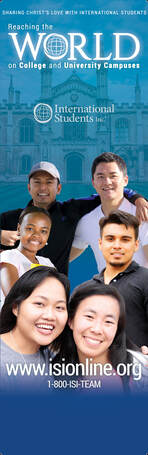
Reaching the World
|
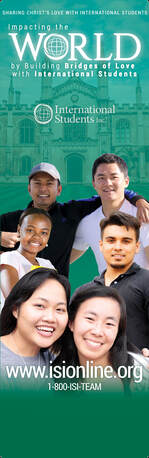
Impacting the World
|
We are now offering a number of customizable ISI display items in various attractive designs (including table coverings) for use in your local ministry! Click HERE to view options and place an order.
IMPORTANT NOTE: If you are presently using displays featuring an old ISI logo, we do request that you now use a display with the current trademarked ISI logo. For additional questions, please contact Rebekah.
Sample Displays
Additional design options may be viewed on the order form.

Reaching the World Display

Impacting the World Display
|
Contact Us
|


